Apple Watch's Effort Rating: Why It's Worth Turning On for Every Workout
 By Marina, Astrea co-founder Substack
When I started training again after my pregnancy, I made one deliberate choice: strength training first, running later. A few weeks in, I exported my Apple Health data to look through it, and one column stopped me: training effort, empty, workout after workout. My old runs had never had that problem. So I went looking for why, and found the actual answer: Apple Watch had been scoring my runs automatically the whole time, while strength training needed me to add a rating myself, a step I didn’t know existed until I went digging for it.
Quick digest
- Effort Rating scores how hard a workout felt on a 1–10 scale, where 10 is your hardest possible effort.
- Apple Watch calculates it automatically, using your heart rate, VO2 max, age, height, and weight, but only for around 17 cardio-heavy workout types like running, cycling, swimming, and rowing (Apple Inc., n.d.-a; DC Rainmaker, 2024).
- For strength training, Pilates, yoga, and most other workout types, nothing is filled in until you tap “Add Effort” yourself.
- Rating your own effort by feel, rather than only reading a pre-filled number, exercises the same skill researchers call interoception: your ability to notice signals from inside your own body.
- This number is exactly what feeds Apple’s Training Load feature and any acute:chronic workload ratio (ACWR) you calculate from your data, so skipping it on some workout types quietly leaves gaps in both.
What Effort Rating actually measures
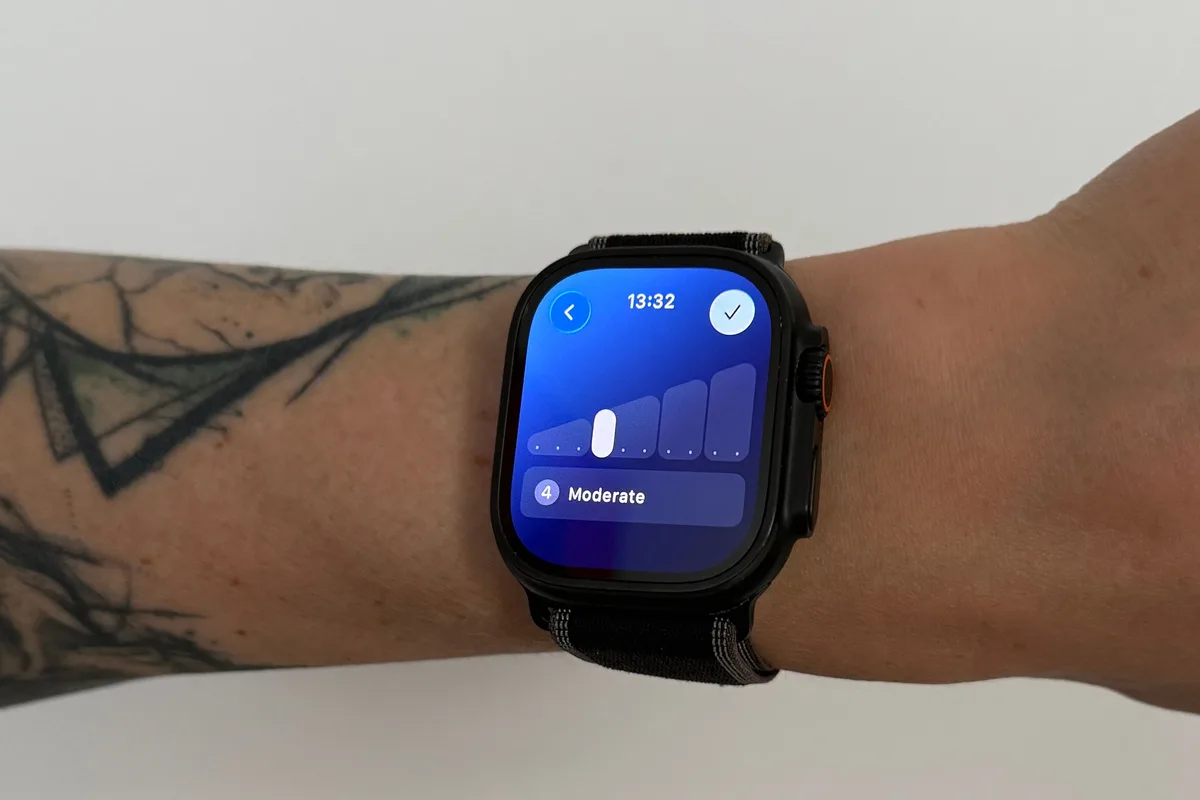
After you end a workout, Apple Watch asks you to turn the Digital Crown and rate how hard it felt, on a scale from 1 to 10, with 10 being an all-out effort (Apple Inc., n.d.-a). For a set of roughly 17 workout types that Apple treats as reliably aerobic, things like outdoor and indoor running, walking, cycling, swimming, rowing, hiking, the elliptical, and high-intensity interval training, the watch fills in an estimated number for you automatically, built from your heart rate during the session, your VO2 max, and personal details like age, height, and weight (Apple Inc., n.d.-a; DC Rainmaker, 2024). You can leave that estimate as is or adjust it, either right after the workout or later, in the Fitness app on your iPhone under Sessions.
Strength training doesn’t get that automatic estimate, and neither do a long list of other workout types, from Pilates to dance to most functional fitness formats. For those, the “Add Effort” prompt sits inside the end-of-workout summary, something you scroll past rather than something the watch pushes in front of you the way it does for a run (DC Rainmaker, 2024). If a rating is already sitting there when you finish a run, you’ll probably glance at it and move on. If you have to notice, scroll, and tap for a strength session, it’s easy for that workout to end up with no effort data at all, exactly what happened to my strength sessions for weeks.
Here’s what that “Add Effort” step actually looks like, straight from Apple’s own instructions (Apple Inc., n.d.-a):
On your Apple Watch, right after a workout:
- Open the Workout app and finish your session as usual: swipe right, then tap End.
- Turn the Digital Crown to scroll through the workout summary.
- Tap Effort (it may say “Add Effort” if nothing was auto-filled).
- Turn the Digital Crown to set your rating from 1 to 10, then tap Done.
- Tap End at the top to finish.
On your iPhone, any time after the fact:
- Open the Fitness app and tap Sessions.
- Tap the workout you want to rate or edit.
- Tap Effort, drag the slider to set your rating, then tap Update.
Full step-by-step instructions, including screenshots, are on Apple’s own support page: End and view a summary of your workout on Apple Watch.
Apple hasn’t published its reasoning for the split, but the pattern lines up with how the underlying estimate works: heart rate climbs in a fairly predictable way with aerobic intensity, which is what the automatic model is built on, while heart rate during a set of squats or a HIIT circuit doesn’t track effort nearly as cleanly. Manual rating sidesteps that problem for workout types where the automatic model wouldn’t be reliable in the first place.
Rating your own effort is a small interoception exercise
Interoception is the general term for your ability to sense what’s happening inside your own body: your heart beating, your breathing rate, muscle fatigue, how close you are to your limit. It’s a real, measurable skill, not just a personality trait, and researchers test it with tasks like counting your own heartbeats without checking a pulse.
One study had participants classified as either good or poor heartbeat perceivers cycle at a self-chosen pace for 15 minutes. The good perceivers covered a shorter distance and showed a smaller rise in heart rate, stroke volume, and cardiac output for the same task, evidence of a more careful, better-calibrated pacing strategy tied to how well they could read their own internal signals (Herbert et al., 2007). A separate study found that how strongly interoceptive accuracy shapes perceived exertion and mood during exercise depends on intensity: the relationship shows up differently at a moderate effort than it does at a hard one (Farias-Junior et al., 2023).
None of this means glancing at a number makes you better at sensing your own body. But typing in your own rating, based on how a set or a run actually felt, before checking what the watch estimated, is a small, repeated practice in paying attention to the same internal signals that research on interoception is measuring. Reading a pre-filled estimate and tapping “confirm” skips that practice entirely, especially for the cardio workouts where the algorithm has already made a guess before you’ve had the chance to make your own.
Where this feeds into training load and ACWR
Apple’s own Training Load feature takes your effort rating, multiplies it by workout duration, and compares your last 7 days of that total to your last 28 days, sorting the result into a scale from well below to well above your usual load (Apple Inc., n.d.-b). That’s the same session-RPE logic (effort × duration) that sport scientists have used for over two decades to track training load without any hardware at all (Foster et al., 2001), and it’s the exact math behind the acute:chronic workload ratio, which we covered in detail in a separate article.
Which means a rating you skip isn’t a cosmetic gap. If your strength sessions never get an effort score, they contribute nothing to either Apple’s own Training Load graph or to any ACWR you calculate yourself from Apple Health data, even though they’re real training stress on your body. A week that looks “steady” or “well below” your usual load might actually include three unrated strength sessions that would tell a very different story if they were counted. The tool isn’t wrong here; it’s just working from whatever data you actually gave it.
This is exactly the kind of gap Astrea’s own training load tracking is built to close: it treats a rated strength session with the same weight as a rated run, so your weekly picture doesn’t quietly lose the workouts that didn’t get an automatic estimate.
What I’ve actually changed
- I rate every workout manually now, strength sessions included, right when I end them rather than trying to remember later.
- For cardio workouts where Apple pre-fills a number, I try to think about how the session actually felt before I look at the estimate, then adjust if my own sense and the algorithm’s guess don’t match.
- I keep a consistent personal scale in my head: 1 is barely more than resting, 10 is the hardest I could sustain for that session, and I try not to let it drift week to week.
- Once a week, I check whether my Training Load classification actually matches how recovered or run down I feel, rather than taking the label at face value.
FAQ
Is Apple’s Effort Rating the same thing as RPE? Conceptually, yes. It’s the same 1–10 exertion scale that sport scientists use in the session-RPE method (Foster et al., 2001), with the addition that Apple auto-fills an estimate for certain workout types based on your heart rate and personal data.
Which workouts get an effort score automatically, and which don’t? Around 17 cardio-heavy types get an automatic estimate: running, walking, cycling, swimming, rowing, hiking, the elliptical, HIIT, and similar (Apple Inc., n.d.-a; DC Rainmaker, 2024). Strength training, Pilates, yoga, and most other formats need a manual “Add Effort” tap in the workout summary.
Do I need a specific Apple Watch or software version for this? Effort Rating and Training Load arrived together with watchOS 11 in 2024 (DC Rainmaker, 2024). You’ll need that update or later.
Can I go back and change a rating I already gave? Yes. In the Fitness app on your iPhone, tap Sessions, tap the workout, tap Effort, drag the slider, then tap Update (Apple Inc., n.d.-a).
Does skipping an effort rating affect my Activity rings or calories? No. It’s separate from rings and calorie estimates. The only thing it feeds is Training Load and any workload calculation, like ACWR, that you or another app build from that data.
Is a self-rated number actually reliable, or is it just a guess? More reliable than it might seem. In powerlifters, the gap between a self-rated effort and the actual target effort averaged well under half a point on a 10-point scale, which suggests people get reasonably accurate at this with practice (Helms et al., 2017).
Sources
Apple Inc. (n.d.-a). End and view a summary of your workout on Apple Watch. Apple Support. https://support.apple.com/guide/watch/end-and-view-a-summary-of-your-workout-apd95450de2a/watchos
Apple Inc. (n.d.-b). Track your training load on Apple Watch. Apple Support. https://support.apple.com/guide/watch/track-your-training-load-apde4c07a6cf/watchos
DC Rainmaker. (2024, June 10). Apple’s new watchOS 11: Training load, turn-by-turn trail routes, and more! https://www.dcrainmaker.com/2024/06/apples-new-watchos-11-trainining-load-turn-by-turn-trail-routes-and-more.html
Farias-Junior, L. F., Machado, D. G. S., Agrícola, P. M. D., Nascimento, P. H. D., Elsangedy, H. M., Okano, A. H., & de Sousa, M. B. C. (2023). Intensity-dependent influence of interoceptive accuracy on psychophysiological responses during aerobic exercise in physically inactive men. Perceptual and Motor Skills, 130(4). https://doi.org/10.1177/00315125231182041
Foster, C., Florhaug, J. A., Franklin, J., Gottschall, L., Hrovatin, L. A., Parker, S., Doleshal, P., & Dodge, C. (2001). A new approach to monitoring exercise training. Journal of Strength and Conditioning Research, 15(1), 109-115.
Helms, E. R., Brown, S. R., Cross, M. R., Storey, A., Cronin, J., & Zourdos, M. C. (2017). Self-rated accuracy of rating of perceived exertion-based load prescription in powerlifters. Journal of Strength and Conditioning Research, 31(10), 2938-2943. https://doi.org/10.1519/JSC.0000000000002097
Herbert, B. M., Ulbrich, P., & Schandry, R. (2007). Interoceptive sensitivity and physical effort: Implications for the self-control of physical load in everyday life. Psychophysiology, 44(2), 194-202. https://doi.org/10.1111/j.1469-8986.2007.00493.x
A note from us We’re Martin and Marina, Astrea’s co-founders. We’re both into data and serious about our own training, but neither of us is a doctor or a clinical researcher. The health and physiology claims in this article come from published, peer-reviewed research, not our own expertise, which is why every article ends with a Sources list above. If a claim doesn’t trace back to a real source, we cut it before it gets published.
Astrea tracks your training load automatically and flags when you’re ramping up too fast — before it turns into an injury.


Related reading · See all Training Load & Periodization